A concept prototype for an AI tool that helps commercial lending analysts review the leases behind a loan. Three AI agents read the lease, flag risks with a confidence score and a link to the exact source text, and draft fixes. The analyst makes every decision.
AI that reads long contracts is easy to demo and hard to trust. In lending, one missed clause can put millions of dollars of rent at risk, and a credit committee will ask who approved each condition and why. I wanted to design an AI tool for that setting: one that shows its work, admits when it’s unsure, and keeps the human in charge.
Role: UX Designer for AI (solo, self-initiated concept: product framing, interaction design, Figma, and prototype)
Timeline: October 2026, about one week
Tools: Figma, React, Tailwind CSS, Netlify, Claude (AI design and build partner)
Users: Commercial real estate credit analysts at banks; the credit committees who review their recommendations
Live prototype: auditbrain-ai.netlify.app
The Problem:
When a bank lends against an office building, the leases are what repay the loan. An analyst has to read each lease, often 50 pages plus amendments, and spot terms that put that income at risk, like a tenant who can leave halfway through the loan term. It’s slow, detailed work, and the risky clause can be one sentence on page 22.
AI can read faster, but a black-box answer creates new problems. The analyst can’t see where a claim came from, how sure the AI is, or who approved what. In a regulated, high-stakes job, an AI that is fast but untrustworthy saves no time, because every answer has to be checked again by hand.
The solution:
AuditBrain audits the lease against the loan. The lease is what gets read, the loan’s terms are the yardstick, and the fixes are loan conditions, because the bank controls its loan, not the lease.
Three agents work in parallel: a Financial Risk Agent, a Regulatory Compliance Agent, and a Loan Conditions Agent that drafts a fix for each finding. Every finding shows how confident the agent is and links to the exact lines in the lease, which scroll into view next to the finding. The analyst decides each one: keep the clause as written, request a lease change, use or edit the proposed loan condition, or mark the finding as wrong. When every finding has a decision, AuditBrain assembles a credit memo draft for the committee, with a full decision record.
Challenges
- Designing for the right user. My first version was written from the tenant’s side and drafted counter-offers to the landlord. When I chose a commercial lending analyst as the primary user, the meaning of the clauses flipped. A long automatic renewal is bad for a tenant but good for a lender, because it keeps rent coming in.
Solution: I reframed the whole product around the lender. Findings became risks to loan repayment, the drafted fixes became loan conditions, and the core idea became “audit the lease against the loan.” - Making AI uncertainty visible without adding noise. A confidence percentage on every card is easy to skim past, and a single confident number can hide real disagreement.
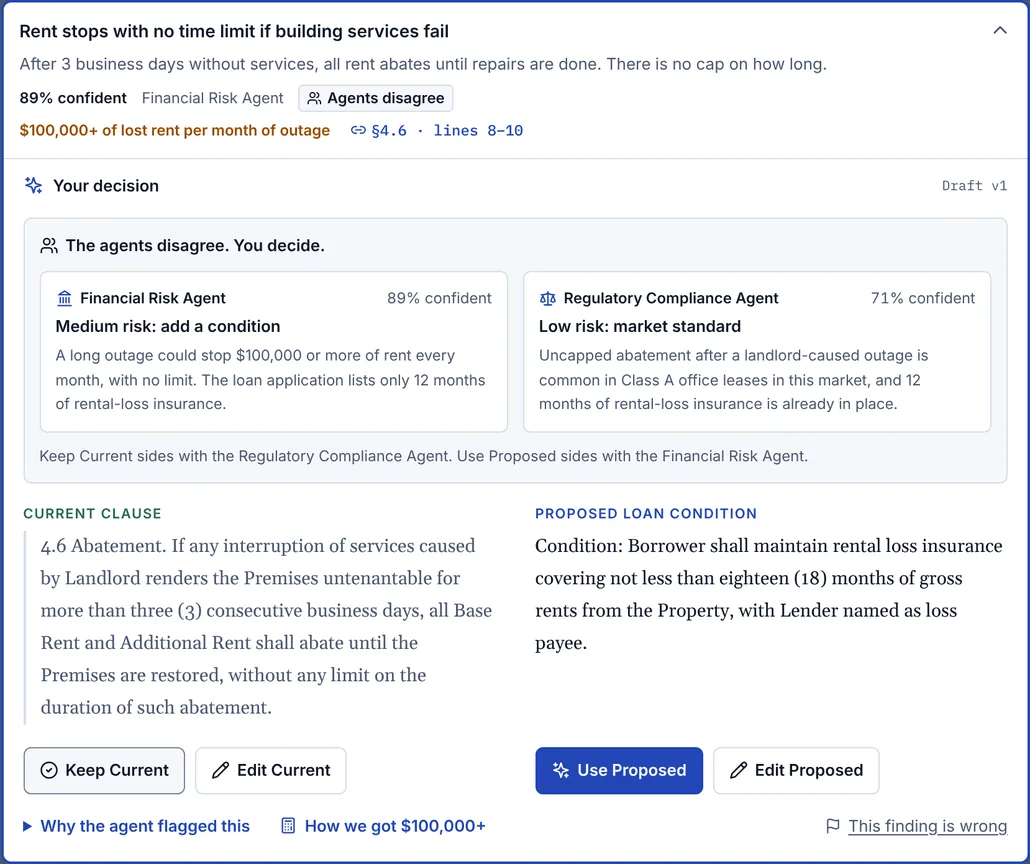
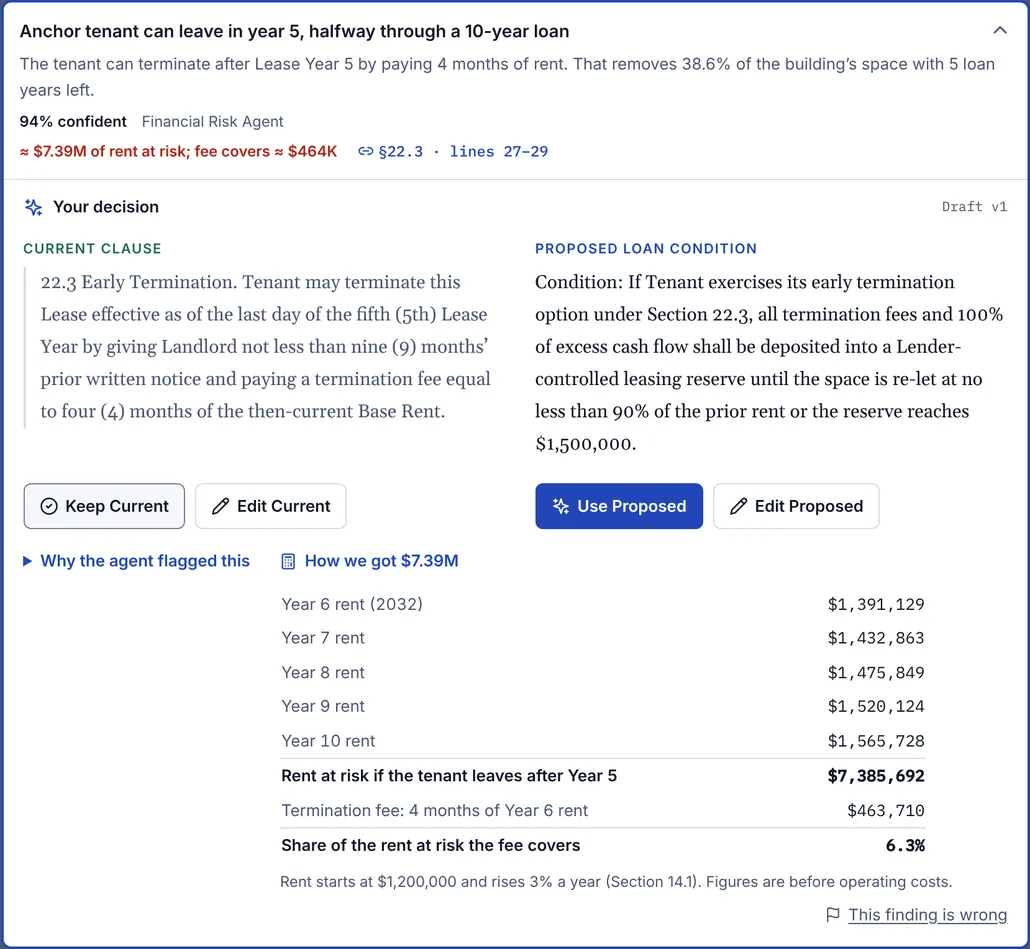
Solution: Findings under 80% confidence get a “Verify” chip. When two agents disagree, the card says so and shows both positions with their confidence, plus which decision sides with which agent. Dollar figures have a “How we got this” breakdown, so the analyst can check the math behind “$7.39M of rent at risk.” - Traceability that holds up in use. Highlighting the source lines doesn’t help if they’re scrolled out of view, and early versions highlighted the text without bringing it next to the finding.
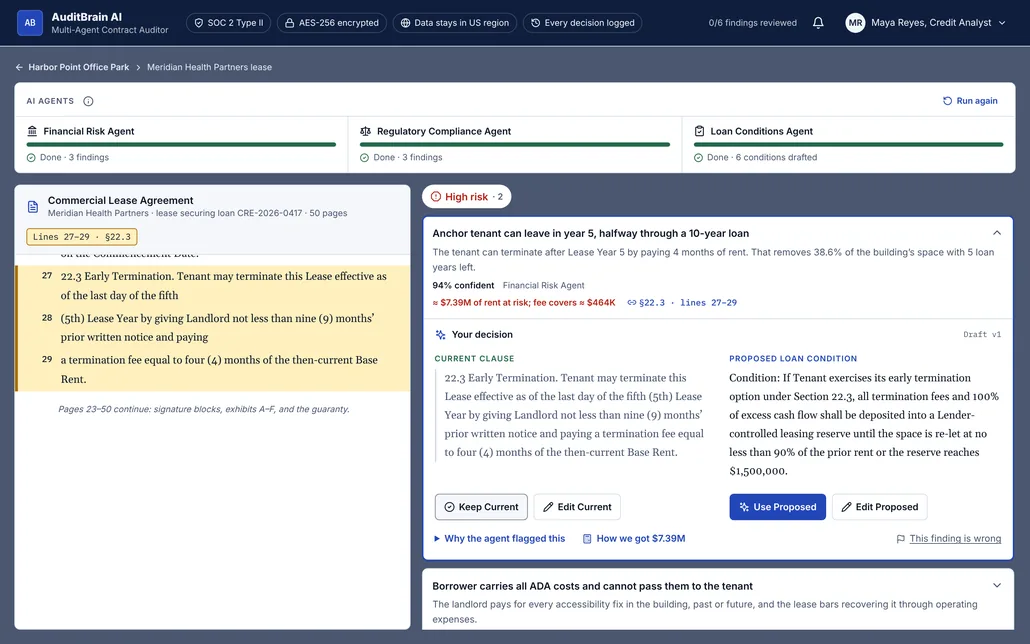
Solution: The lease scrolls on its own, separate from the findings. When a finding opens, the highlighted clause lines up level with the card and stays aligned as the analyst scrolls, so the AI’s claim and the contract’s actual wording are always side by side. - Latency. Reading and analyzing a 50-page lease takes minutes, not seconds, and a blank screen during that time makes people leave or lose trust.
Solution: An agent tracker shows each agent’s progress and current step. Findings appear as each agent finishes, the Loan Conditions Agent visibly waits for the other two, and the decision buttons stay disabled until there’s a draft to decide on. - Keeping the human in the loop without rubber-stamping. In one iteration, “Keep Current” was a green button. Green reads as the safe choice, but here it meant “accept the risk,” which nudged analysts to wave risks through. Removing the “Reject” button had also removed any way to tell the AI it was wrong.
Solution: “Keep Current” became a neutral gray button and only the AI-recommended action is emphasized. I added “This finding is wrong” with specific reasons, so feedback flows back to the agents. Every decision is timestamped in a decision log and carried into the credit memo. - Accessibility in a dense, data-heavy interface. Small type, status colors, and a live progress display are all easy places to fail WCAG.
Solution: Every text and background pairing passes WCAG AA in light and dark themes, form fields meet the 3:1 rule for borders, risk is shown by icon and label as well as color, and agent progress is announced to screen readers once instead of every tenth of a second.
Results
This is a concept prototype that hasn’t been tested with analysts yet, so these results are what I delivered.
- 1 live, end-to-end prototype: deal screen, lease review, decision step, and credit memo draft
- 3 AI agents and 6 findings across high, medium, and low risk, each traced to exact lease lines
- 7-lease sample deal with internally consistent numbers (rent roll, debt coverage, termination risk)
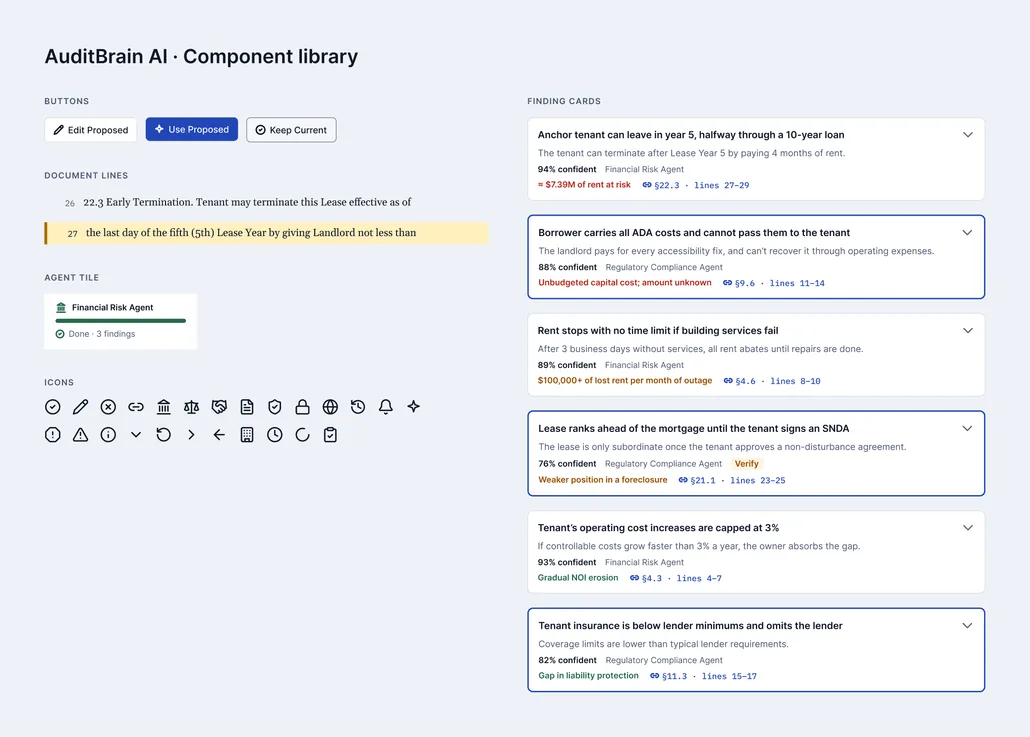
- 5 Figma frames and a component library (buttons, finding cards, document lines, agent tiles, icons) built on light and dark color variables
- WCAG AA contrast checked for every text and background pairing, in both themes
Users:
Commercial real estate credit analysts at banks. My persona, Maya Reyes, starts her Monday with a list of active deals. For each loan she needs to know whether the leases reliably support repayment, and she has to defend every recommendation to a credit committee.
The Process:
- Started from a brief for a multi-agent contract auditor built on three AI UX principles: show progress during long AI tasks, make every finding traceable, and keep a human checkpoint on every automated output
- Built a first interactive prototype quickly, to have something concrete to react to
- Chose a primary user and reframed the product around the lender’s perspective
- Mapped the analyst’s actual workflow (deal list, then loan, then leases), which added a deal screen above the lease review
- Iterated between Figma and the coded prototype: moved from a 50/50 to a 40/60 layout, moved the decision step inside each finding card, and refined type and color
- Added trust features: agent disagreement, “How we got this” math, “This finding is wrong” feedback, and the credit memo
- Ran an accessibility pass and deployed the prototype to Netlify
The Deal Screen
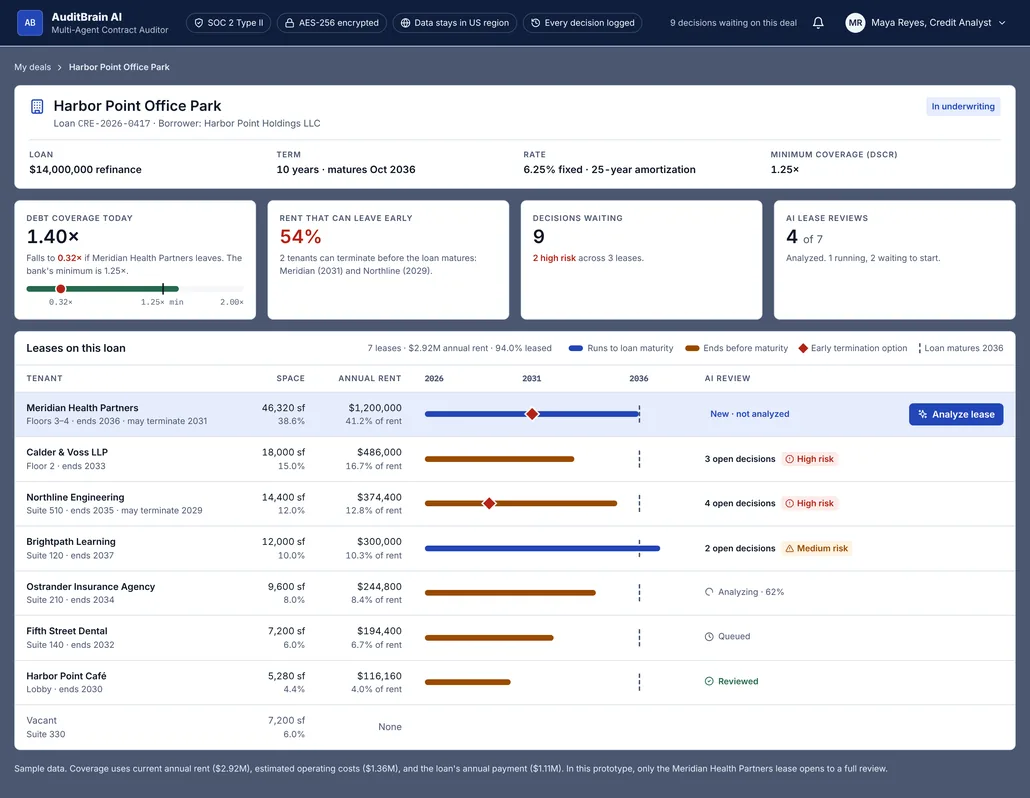
Where Maya starts: the loan’s terms, debt coverage with and without the anchor tenant, how much rent can leave early, and every lease on the loan with a timeline against the loan’s maturity.
Lease Review: Traceability
The open finding and its source clause line up side by side, with the clause highlighted in the lease.
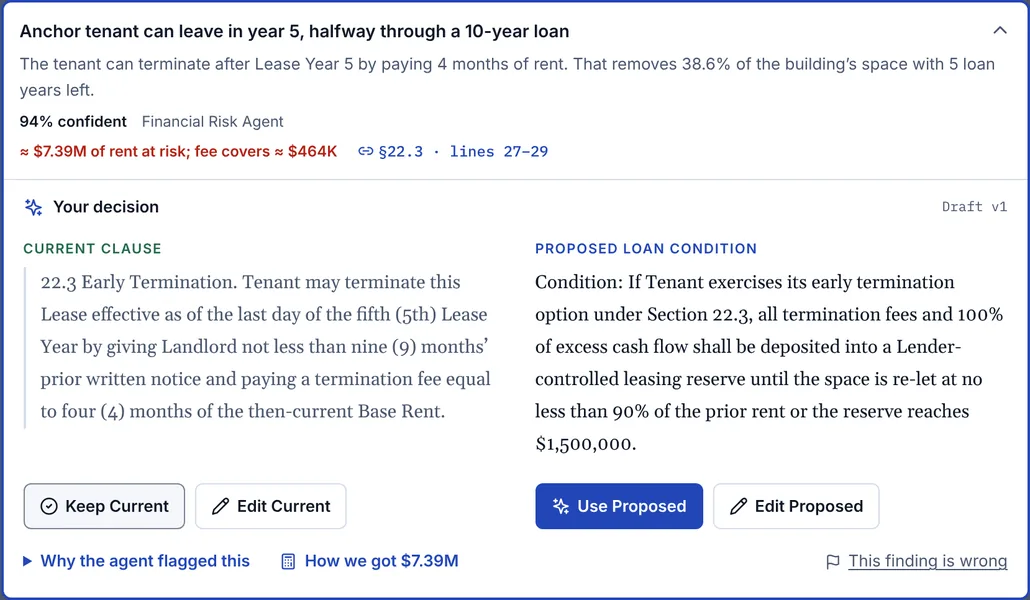
The Decision Step
The current clause and the proposed loan condition side by side, each with its own actions.
When the Agents Disagree
When two agents reach different conclusions, the card shows both positions and their confidence, and says which decision sides with which agent.
Showing the Math
Every dollar figure can be opened to show how the agent calculated it.
Agents at Work
Each agent shows its progress and current step, and findings appear as soon as each agent finishes.
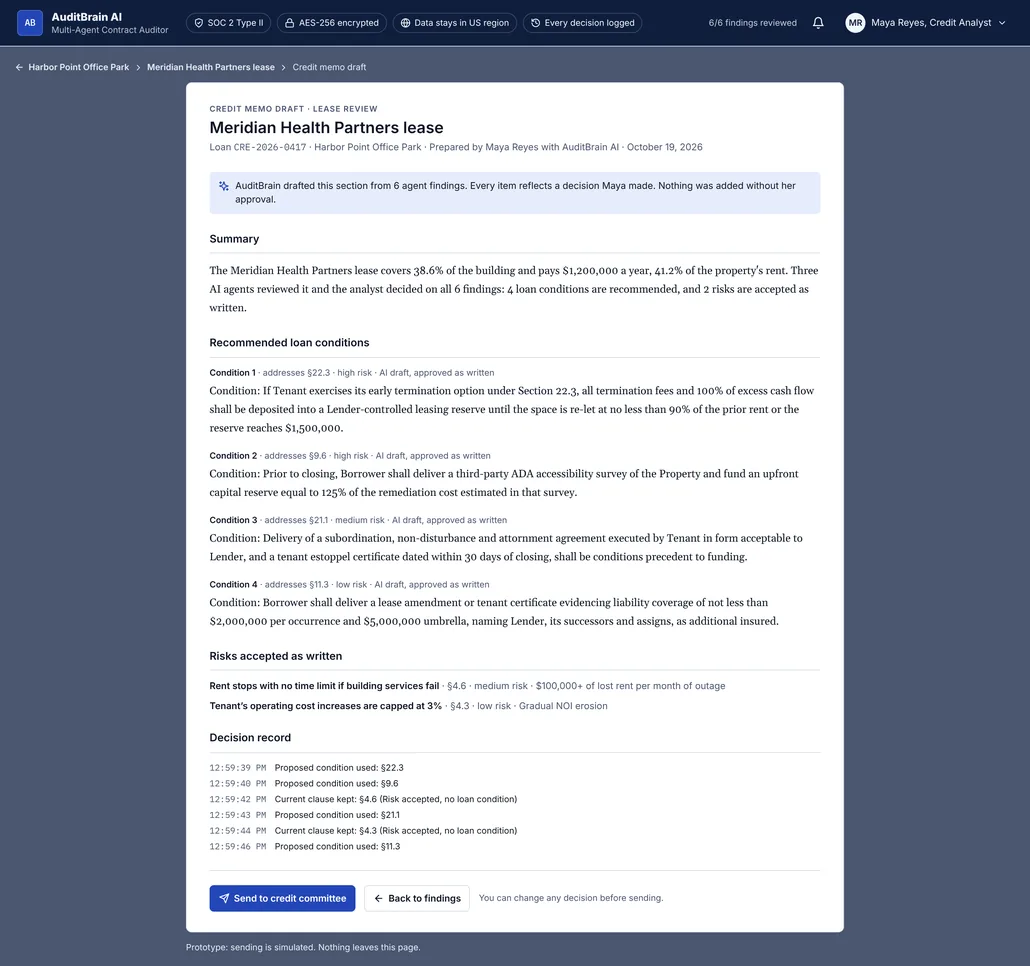
Credit Memo Draft
Every decision becomes part of a memo section for the credit committee, labeled as AI-drafted and analyst-approved.
Figma Components
What I’d do next
Test the prototype with 3 to 5 commercial lending analysts, have a lending professional check the loan conditions and coverage math, design the lease upload flow with readability checks before the agents run, and add a review across all the leases on a loan so risk can be compared tenant by tenant.